


Word Connect
4.8159.81K Reviews
App Specs
- Version
- 9.826.515
- Updated On
- License
- Free
- Downloads
- 50,000,000+
- Developer
- ZenLife Games Ltd
- Categories
- Word
- Platform
- Android, iOS
Screenshots
 Analysis by AppCompare
I tend to reach for Word Connect when I want a small word puzzle I can pause without losing the thread. The basic idea is easy to grasp, but finding every word in a set of letters can take more concentration than it first seems. That makes it a good fit for short breaks, though it is less suitable if you want a deep, story-driven game or a demanding vocabulary course.
Where the letter puzzles can trip you up
Most of the friction comes from the gap between spotting a word and knowing whether the game will accept it. I find it helps to stop swiping randomly and instead look for a few likely short words, then rearrange the same letters to test different beginnings and endings. If you keep circling the same combinations, take a brief pause; returning with fresh eyes is often more useful than forcing guesses.
A word you recognize may not fit the puzzle’s accepted answers, and that can feel frustrating when you are certain you have found something sensible. I treat the board as a puzzle with a particular answer set rather than a complete test of my vocabulary. If a level starts feeling like a battle over one elusive entry, it is a good moment to step away or use whatever help is available in the game rather than let a casual session become a chore.
Guides and Analysis on Word Connect
Simple checks before a session
Because the controls are based on swiping letters, I would first check that my finger is tracing clearly across the intended letters if an answer does not register. A hurried gesture can be mistaken for a different path, especially when I am playing one-handed. Slowing down for a second is a better first fix than assuming the level or the game has broken.
For a calmer session, I also choose a time and place where I can look at the screen comfortably. The clean presentation makes the letters easy to focus on, but playing while distracted can make an otherwise obvious combination easy to miss. The game is free to download, with in-app purchases ranging from $0.99 to $99.99 per item, so I would also be mindful of purchase prompts and make sure any spending decision is deliberate.
Getting back into a puzzle
Word puzzles work best for me when I keep each attempt focused. I scan for short, familiar words first, then use those discoveries to notice less obvious arrangements. If progress stalls, I leave the board for a little while instead of repeatedly trying the same sequence. This simple reset is especially useful during a commute or while waiting, when interruptions are likely and there is no need to finish a level in one sitting.
If a session is interrupted, I would reopen the game and check whether the current puzzle is still available before beginning a new one. When the game itself seems unresponsive, closing and reopening it is a sensible general step; if the problem continues, checking that the device is running a compatible system is more useful than repeatedly tapping the screen. Word Connect’s minimum operating system is version 8.0, and the current version is 9.214.490.
Worth Reading Before You Choose

Google Calendar Makes a Crowded Week Easier to Manage

Ludo King Makes the Most of the Minutes Between Plans

Baby Panda World Brings Quick Play to Modern Phones, but Its Game Library Feels Busy

ESPN’s Live Game View Makes Following Close Games Easier

QuizzLand Review: A Good Fit for Short Trivia Breaks, Not Every Player

Basketball Stars: Multiplayer Is Fast, but Can It Recover When Matches Go Wrong?
When a missed answer may not be a technical problem
It is easy to assume that an unaccepted word means a swipe failed, but sometimes the issue is simply that the answer set does not match the word I had in mind. I check whether I traced the intended letters in the intended order, then try another arrangement. If the same word remains unavailable, I move on rather than treating every rejection as a device fault.
Likewise, a difficult level does not necessarily mean the game has stopped working. The challenge can come from overlooking a familiar word or getting stuck in one pattern of thinking. On the other hand, if gestures consistently fail across multiple attempts, I would first check the touch response on the device and try again when the screen is clean and my movements are deliberate. That separates a puzzle-solving snag from a broader control issue.
The Gameplay: Simple Yet Addictive
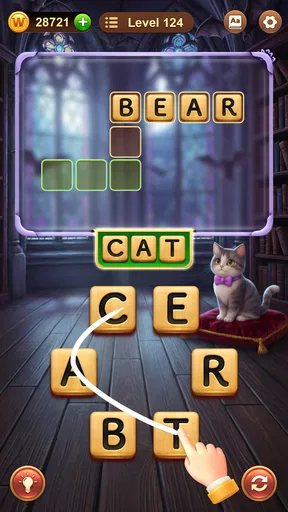
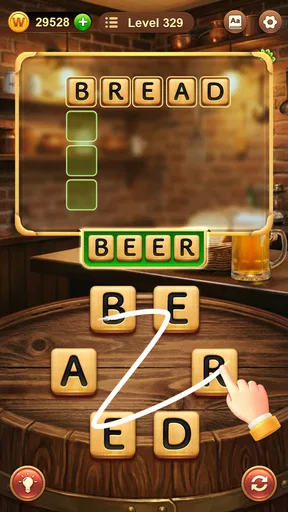
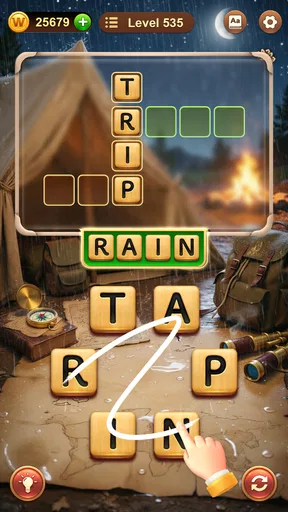
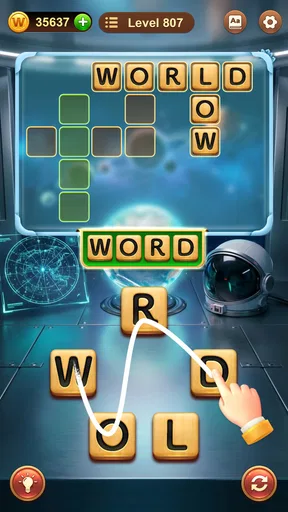
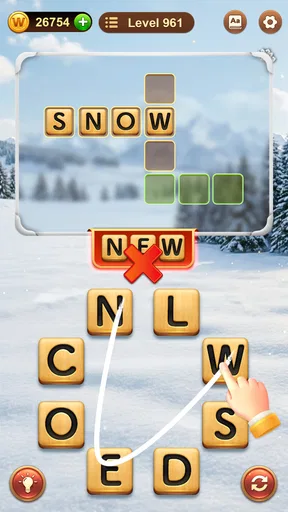
At its core, Word Connect is all about forming words from a jumbled set of letters. Sounds simple, right? Well, that’s the beauty of it. The simplicity is what makes it so addictive. You start with a handful of letters at the bottom of your screen, and your job is to swipe them into valid words. The more words you find, the more points you earn, and the more levels you unlock.
The game eases you in gently with some straightforward levels to get your brain warmed up. But don’t be fooled! As you progress, the levels become increasingly challenging, pushing your vocabulary and problem-solving skills to the limit. It’s a brilliant way to learn new words and keep your brain sharp.
Graphics and Sound
The graphics in Word Connect are clean and straightforward, which is exactly what you need for a game of this nature. There’s no unnecessary clutter or distractions—just you, the letters, and your mission to connect them. The colors are soothing, and the animations are smooth, making for an aesthetically pleasing experience.
The sound design is also worth mentioning. The gentle background music and subtle sound effects add to the overall calming atmosphere of the game. It’s the kind of game you can play to unwind after a long day without it feeling like a mental workout.
Why You'll Love It
One of the standout features of Word Connect is its accessibility. Whether you're a word aficionado or just someone looking for a casual gaming experience, this game caters to all. It doesn’t discriminate based on your vocabulary prowess; instead, it encourages you to learn and grow as you play.
Moreover, the game is incredibly user-friendly. The interface is intuitive, and the controls are a breeze to master. You’ll find yourself lost in the game within minutes, with your only concern being when to take a break!
Who will get the most from it
I think the strongest use case is a short, low-pressure pause: waiting for a ride, sitting in a waiting room, or taking a few minutes between tasks. You can focus on a board, put the phone down when life interrupts, and return when you have another moment. For a practical routine, I would play one puzzle at a time and stop when I catch myself guessing without thinking; that keeps the game relaxing rather than turning it into a test.
Compared with word searches, which ask you to spot words already arranged in a grid, this game asks you to build answers from a shared set of letters. Compared with crosswords, it gives less help from definitions and crossing answers, so success depends more on trying combinations and recognizing patterns. That makes it easy to pick up, but it may not satisfy someone who wants clues, a large collection of unfamiliar vocabulary, or a structured lesson.
It is also a reasonable choice for casual players who do not consider themselves word experts. I would skip it if repeated letter puzzles feel too similar, if you dislike ads in free games, or if you want a game with a strong narrative or multiplayer competition. The Everyone content rating makes it broadly accessible, but whether the puzzle style suits someone is a matter of taste.
In-Game Purchases and Ads
Now, let’s talk about the business side of things. Word Connect is free to download and play, which is fantastic. However, like many free games, it comes with ads. The ads can sometimes interrupt the flow, but they're not overly intrusive. If you're the kind who prefers an uninterrupted experience, you can opt for in-game purchases to remove ads. There are also options to buy hints, but the game is generous with hints earned through gameplay, so spending isn’t necessary unless you’re really stuck.
My practical advice is to decide before starting whether you are comfortable with occasional interruptions and to avoid buying anything just because a level is testing your patience. Hints can help you move past a stubborn board, but using one immediately may also cut short the satisfying moment of finding the answer yourself. I would save help for when I have genuinely tried several approaches, rather than spending to speed through every puzzle.
A word-game choice with a clear trade-off
ZenLife Games Ltd developed this word game, and its broad appeal is reflected in its 4.8 average from around 1.3 million ratings, alongside more than 50 million installs. Those figures suggest that plenty of people enjoy this style, but they do not guarantee it will suit your habits. The key question is whether you like making words from letters without needing a long explanation or a fixed play session.
For me, its best quality is that it is approachable without being entirely mindless: an easy board can be a quick diversion, while a tougher one gives me a reason to slow down and test combinations. The trade-off is that the same central action can feel repetitive if I play for too long. I would use it as a compact break-time game, not as my only choice if I am looking for variety or a more involved challenge.
Final Thoughts
All in all, Word Connect is a delightful game that offers a perfect blend of fun and learning. It's one of those rare games that manage to be both relaxing and stimulating at the same time. Whether you're commuting, waiting in line, or just chilling at home, this game is a great companion. It’s no wonder it has garnered such a massive following.
If you love word games and are up for a challenge, I highly recommend giving Word Connect a try. You might just find yourself hooked, expanding your vocabulary, and having a blast while doing it. Happy word hunting!
Pros
- Engaging puzzles enhance vocabulary skills.
- Simple and intuitive user interface.
- Works offline for on-the-go play.
- Daily challenges keep gameplay fresh.
- Minimal ads enhance user experience.
Cons
- Repetitive levels may reduce interest.
- Limited hints can frustrate players.
- Ads interrupt gameplay occasionally.
- In-app purchases can be costly.
- No multiplayer or social features.
FAQs for Word Connect
What is Word Connect, and how does it work?
Word Connect is a puzzle game that challenges players to form words from a set of given letters. The objective is to swipe letters to create valid words and fill in the blanks on the crossword-style board. As you progress, the levels become more challenging, requiring a broader vocabulary and strategic thinking to solve.
Is Word Connect free to play, and are there in-app purchases?
Word Connect is free to download and play. However, it offers in-app purchases that allow players to buy coins or hints to help solve more challenging levels. While the game can be enjoyed without spending money, these purchases can enhance the experience by providing additional support and removing ads.
Does Word Connect require an internet connection to play?
Word Connect does not require an internet connection to play, making it a great option for gaming on the go. However, certain features, like purchasing in-app items or viewing ads for rewards, will need an internet connection. Offline play is seamless and retains all game progress.
What platforms is Word Connect available on?
Word Connect is available for both Android and iOS devices. It can be downloaded from the Google Play Store for Android users and the Apple App Store for iOS users. The game is optimized for both smartphones and tablets, providing a consistent experience across different devices.
How can I get help if I’m stuck on a level in Word Connect?
If you're stuck on a level in Word Connect, you can use hints to reveal letters in the words. Hints can be acquired through in-game currency, which can be earned by playing or purchased. Additionally, connecting with friends or online communities can provide tips and strategies to overcome difficult puzzles.


